
-
After clicking preview button for the vf page for inserting record in Salesforce org, I am getting some error?
I'm getting an error message when I try to save records. The error message is:
URL No Longer Exists
You have attempted to reach a URL that no longer exists on salesforce.com.You may have reached this page after clicking on a direct link to the application. This direct link might be:
• A bookmark to a particular page, such as a report or view
• A link to a particular page in the Custom Links section of your Home Tab, or a Custom Link
• A link to a particular page in your email templatesIf you reached this page through a bookmark, you are probably trying to access something that has moved. Please update your bookmark.
If you reached this page through any of the other direct links listed above, please notify your administrator to update the link.
If you reached this page through a link on our site, please report the broken link directly to our Support Team and we will fix it promptly. Please indicate the page you were on when you clicked the link as well as any other related information. We apologize for the inconvenience.
Thank you again for your patience and assistance. And thanks for using salesforce.com!
The Visualforce page:
<apex:page controller="sampleitem">
<apex:form >
<apex:pageblock >
<apex:pageblocksection >
<apex:pageblocktable value="{!lstWS}" var="S">
<apex:column headerValue="Select">
<apex:inputcheckbox value="{!S.ischecked}"/>
</apex:column>
<apex:column headerValue="Name">
<apex:outputtext value="{!S.swi.Name}"></apex:outputtext>
</apex:column>
<apex:column headerValue="Stage">
<apex:outputtext value="{!S.swi.Stage__r.Name}"></apex:outputtext>
</apex:column>
<apex:column headerValue="Item Name">
<apex:outputtext value="{!S.swi.Item__r.name}"></apex:outputtext>
</apex:column>
</apex:pageblocktable>
</apex:pageblocksection>
<apex:commandButton value="Select" Action="{!doSave}"/>
</apex:pageblock>
</apex:form>
Log In to reply.

Popular Salesforce Blogs

Salesforce Nonprofit Cloud: A Complete Guide for Nonprofits in 2025
Nonprofit organizations work tirelessly to create meaningful change, but they often face challenges like limited resources, scattered data, and complex donor management. In today’s digital-first…


How You Can Boost Online Grocery Sales? | Salesforce Help Guide
COVID-19 has accelerated the shift to eCommerce and it is more evident than in the grocery category. Online grocery buyers have increased nearly 30 percent…


Unlocking Success: Choosing Between Block Pricing and Discount Schedules in Salesforce CPQ
Are you ready to unlock the true potential of Block Pricing and Discount Schedules in Salesforce CPQ? These two powerful tools hold the key to…

Popular Salesforce Videos
Einstein Opportunity Scoring For Everyone | Salesforce
Let artificial intelligence help you and your sales team focus on the right opportunities and close more deals. See how Einstein Opportunity Scoring makes it…


Campaign Management in Salesforce | Campaigns in Salesforce
Learn all about campaign management in Salesforce. Also, get a glimpse of how to create a campaign, add campaign members, how to use campaigns to…

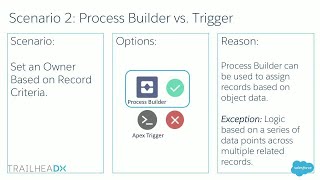
Process Builder or Apex Triggers - Choosing Between Salesforce Automation Tools
The Salesforce Platform offers several means to operate in the background: Process Builder, Triggers, Flow, Workflows, and more. With so many robust options, it can…

Popular Salesforce Infographics

Salesforce and QuickBooks Integration - Transform your Business
Do you know that you can convert 30% of your opportunities into leads when you integrate Salesforce and QuickBooks together? Sounds Interesting right? Our connector eShopSync…


Salesforce: Giving Buzz In Numbers
Salesforce has been coined as the world’s top CRM and there is always a constant buzz around it’s latest developments. So let’s check out what…

The 10.5 Commandments of Salesforce Users
This great piece of visual goodness presents the 10 commandments every Salesforce user needs to follow. Make sure every single one of these practices is…