
-
If a user does not have access to a specific record type, will they be able to see the records that
If a user does not have access to a specific record type, will they be able to see the records that have that record type?


Log In to reply.

Popular Salesforce Blogs

Learn All About Salesforce Hyperforce
Developing a working relationship with customers is critical to a company's long-term success. A strong connection built on trust and communication makes customers feel more…


Lead Management and Lead Conversion in Salesforce
1. What is a Lead? A lead is an individual or organization that has shown interest in your products or services. Leads are potential customers…


10 Reasons You Need a Salesforce Support and Maintenance Partner in 2021
The secret behind the selection of Salesforce maintenance for supervising the marketing processes lies since it assists in improving the business continuously and manages the customer's contentment efficiently. Support…

Popular Salesforce Videos

Create Walkthroughs in Salesforce Lightning Experience
This video shows you how to create a walkthrough with the In-App Guidance Builder. Then you can create hands-on guided training experiences for in-app onboarding,…

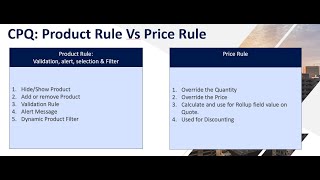
Product Rule Vs Price Rule Salesforce CPQ
Product Rule CPQ product rules help ensure sales reps are putting together the right products and bundles every single time. You don’t have to worry…

Salesforce User Experience UX Designer Certification
The Salesforce User Experience (UX) c is designed for individuals who have at least 6 months in UX design and 3–6 months’ experience utilizing UX…